
Magento SEO Checklist: 22 Steps for Magento 2 Stores

Magento gives you more SEO control than almost any other ecommerce platform, and more ways to get it wrong. The same store can rank or stay invisible depending on a handful of admin settings most owners never open.
This is the checklist we use on real Magento 2 and Adobe Commerce stores. Every step names the exact admin path, so you can work through it without guessing: jump straight to the checklist.
The Magento 2 SEO Checklist at a Glance
Each step is covered in detail further down the page. Paths are for Magento 2.4; labels can shift slightly between minor versions.
| # | Step | Where in the Magento 2 admin | Recommended setting |
|---|---|---|---|
| 1 | Remove index.php from URLs | Stores > Configuration > General > Web > Search Engine Optimization | Use Web Server Rewrites: Yes |
| 2 | Flatten product URLs | Stores > Configuration > Catalog > Catalog > Search Engine Optimization | Use Categories Path for Product URLs: No |
| 3 | Canonical tags for categories | same section | Use Canonical Link Meta Tag For Categories: Yes |
| 4 | Canonical tags for products | same section | Use Canonical Link Meta Tag For Products: Yes |
| 5 | Auto-redirect on URL key changes | same section | Create Permanent Redirect for URLs if URL Key Changed: Yes |
| 6 | URL suffix | same section | Pick .html or blank once, then never change it casually: changing it rewrites every URL on the store |
| 7 | Meta templates for large catalogs | Stores > Configuration > Catalog > Catalog > Product Fields Auto-Generation | Masks for meta title and description, overridden manually on top sellers |
| 8 | Store-view title and description defaults | Content > Design > Configuration > [store view] > HTML Head | Default title, title suffix, default description |
| 9 | Default robots | Content > Design > Configuration > [store view] > Search Engine Robots | INDEX, FOLLOW on production |
| 10 | Custom robots.txt | same section | Block search, checkout, account and compare paths; never block /static/ or /media/ |
| 11 | XML sitemap on cron | Marketing > SEO & Search > Site Map, plus Stores > Configuration > Catalog > XML Sitemap | Scheduled generation, images included, submission to robots.txt enabled |
| 12 | Per-product meta and URL key | Catalog > Products > [product] > Search Engine Optimization | Unique meta title and description; leave Meta Keywords empty, search engines ignore it |
| 13 | Per-category meta | Catalog > Categories > [category] > Search Engine Optimization | Unique meta title and description for every indexable category |
| 14 | CMS page meta | Content > Elements > Pages > [page] > Search Engine Optimization | As above, for landing and content pages |
| 15 | Redirect discontinued products | Marketing > SEO & Search > URL Rewrites | 301 each retired product to its closest category or replacement |
| 16 | Hide configurable children | Catalog > Products > [simple product] > Visibility | Not Visible Individually for simple products that exist only as options of a configurable |
| 17 | Layered navigation index control | extension or theme level (not in core) | noindex,follow on filter URLs; keep a filter indexable only when it matches real search demand |
| 18 | Image alt text | Catalog > Products > [product] > Images and Videos > Image Detail | Descriptive alt text on every gallery image |
| 19 | Product structured data | theme / JSON-LD implementation | Fill the gaps core markup leaves: brand, GTIN, availability, ratings; validate with the Rich Results Test |
| 20 | Full page cache | Stores > Configuration > Advanced > System > Full Page Cache | Varnish in production, never the built-in application cache |
| 21 | Production mode | CLI: bin/magento deploy:mode:set production | Production mode with merged, minified assets |
| 22 | Out-of-stock handling | Stores > Configuration > Catalog > Inventory > Stock Options | Decide deliberately: keep ranking URLs live, 301 replaced items, 410 dead ends |
Keyword Research for Magento Catalogs
Keyword research for a catalog is different from keyword research for a blog. You are not looking for one keyword per page; you are mapping a demand structure onto a category tree.
Start with how buyers describe the product, not how your supplier does. Shoppers search “womens waterproof hiking boots”, not the manufacturer’s line name. Tools like Google Keyword Planner, Ahrefs or Semrush show you the phrasings with volume; your search terms report (Reports > Marketing > Search Terms) shows you what visitors already type into your own store, which is the cheapest keyword research you will ever get.
Then assign intent to levels. Head terms belong to categories, modified terms (“brand + product type”) to subcategories or indexable filter pages, and long specific queries to products. When two pages chase the same term, Magento will happily let them compete with each other; decide the winner yourself.
Magento On-Page SEO, Step by Step
On-page SEO in Magento 2 happens at three levels: store-wide defaults, auto-generated templates, and manual overrides on the pages that earn money. Work in that order.
1. Set the store-view defaults. In Content > Design > Configuration, edit your store view and open HTML Head. Set a default page title, a title suffix (usually your brand), and a default meta description. These are the safety net for pages nobody wrote meta for.
2. Set meta templates for the catalog. In Stores > Configuration > Catalog > Catalog > Product Fields Auto-Generation, define masks like {{name}} | Buy Online | YourStore. On a five-figure catalog you cannot hand-write every tag; templates guarantee a sane floor.
3. Override manually where it pays. Open any product and expand its Search Engine Optimization section to set the URL key, meta title and meta description by hand.
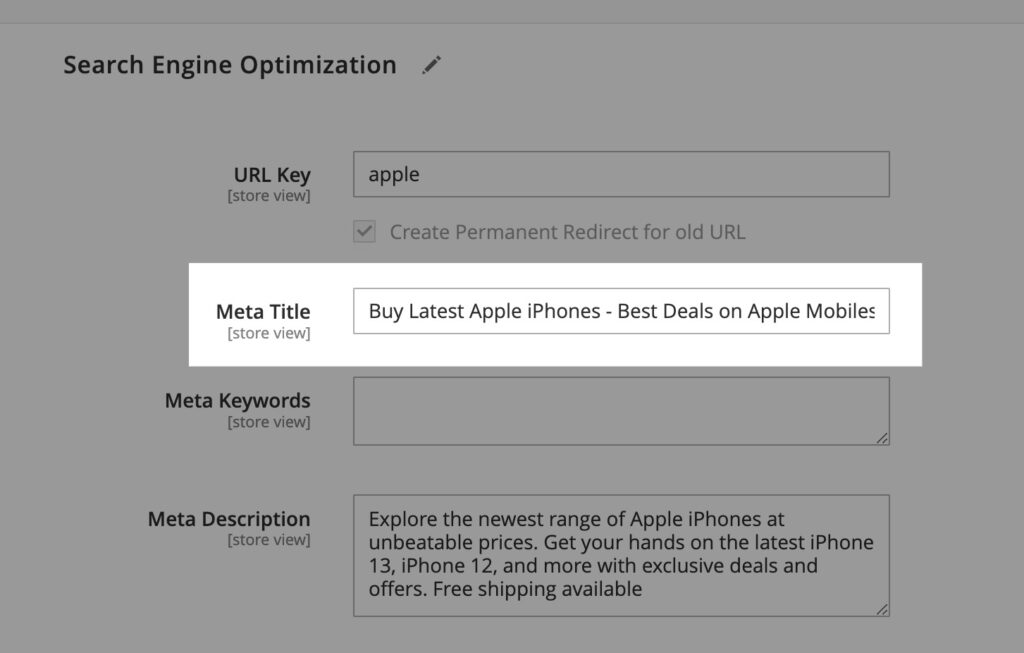
Write the meta title the way the buyer searches, keep it under about 60 characters, and lead with the product, not the brand. The meta description does not affect rankings directly, but it is your ad in the results page, so write it like one:
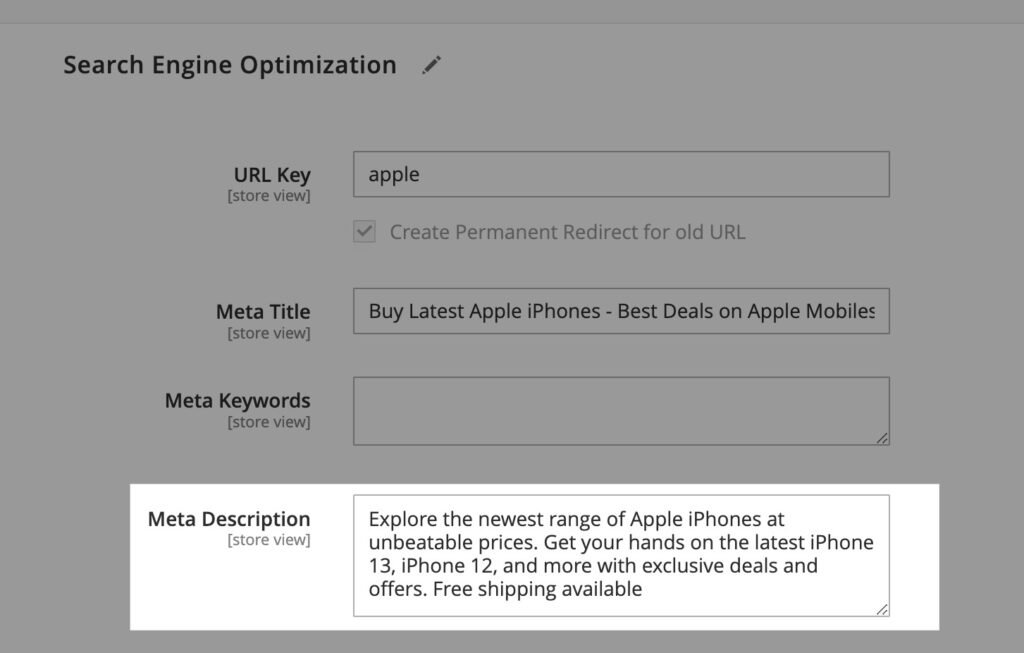
Leave the Meta Keywords field empty. Google has ignored it for well over a decade, and filling it only documents your keyword targets for competitors.
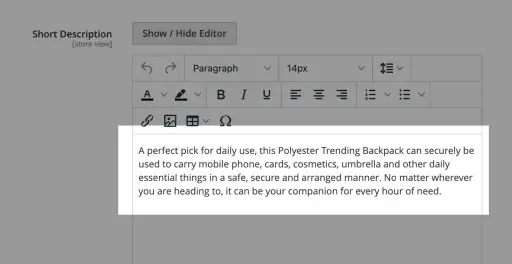
4. Write product descriptions that are not the manufacturer’s. Thousands of stores paste the same supplier copy; a unique description is the cheapest differentiation in ecommerce. Use the short description for the buying case and the full description for specifics:
5. Give every gallery image real alt text. In Images and Videos, open each image’s detail panel and describe what the photo actually shows, including the product name:
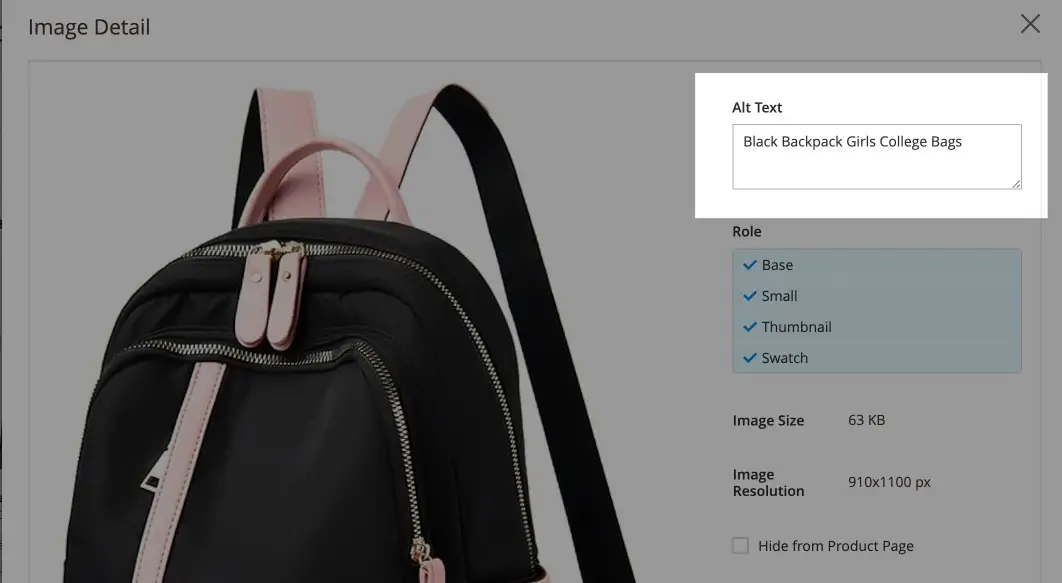
Alt text is an accessibility requirement, an image-search entry point, and one more relevance signal, in that order. For compression and format choices, see our image optimization guide.
6. Keep URL keys clean. The URL key field controls the product’s address. Keep it short, hyphenated and descriptive, and let Magento create the permanent redirect when you change one:
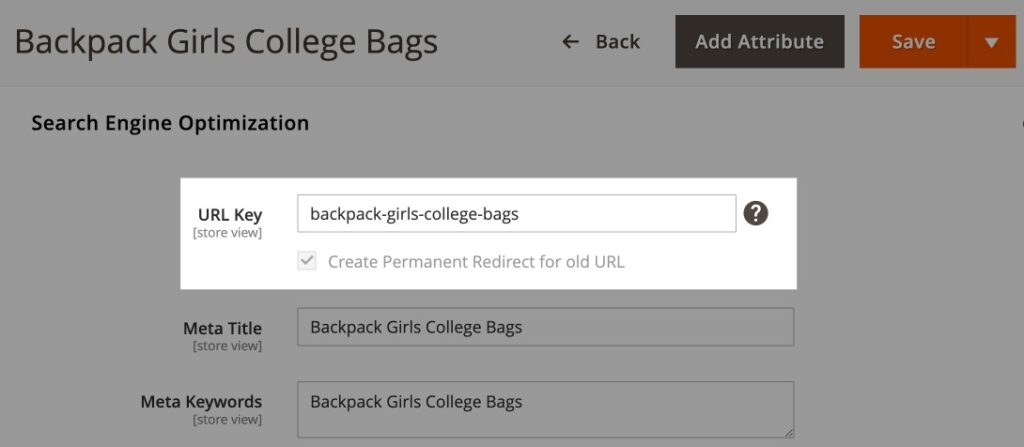
7. Handle configurable products correctly. The simple products behind a configurable (each size and color) should be set to Not Visible Individually unless they genuinely deserve their own search presence. Otherwise every variant becomes a thin, near-duplicate page competing with its parent.
SEO-Friendly URLs in Magento 2
Four settings in Stores > Configuration decide whether your URLs help or hurt you, and three of them default to the wrong value.
- Use Web Server Rewrites: Yes (General > Web > Search Engine Optimization). This removes
index.phpfrom every URL. - Use Categories Path for Product URLs: No (Catalog > Catalog > Search Engine Optimization). With category paths on, a product reachable through three categories exists at three URLs plus the bare one: four duplicates of every product page. Flat product URLs end that class of problem at the source.
- Create Permanent Redirect for URLs if URL Key Changed: Yes. Renames happen constantly on a living catalog; this setting makes every rename a clean 301 instead of a 404.
- Product and Category URL Suffix. Whether you use
.htmlor nothing matters far less than never changing it, because a suffix change rewrites every URL on the store. If you inherit a store, keep whatever it has.
Layered Navigation and Filter URLs
Layered navigation is Magento’s single biggest SEO problem, and the core platform does nothing about it.
Every filter a shopper applies appends a parameter, and every combination is its own URL. A category with five filterable attributes of six values each can mint thousands of URLs that all show roughly the same products:
Before:  /womens-boots?color=black&size=7&material=leather&price=100-200
After:   /womens-boots            (canonical, indexable)
         /womens-boots/leather    (kept indexable: real search demand for "womens leather boots")
Left alone, those parameter URLs burn crawl budget, split link equity and flood the index with near-duplicates. Native Magento 2 does not add noindex to filtered pages, so you need one of three controls, usually via an SEO extension or theme logic:
- noindex,follow on filtered URLs, so crawlers follow links but drop the pages from the index. This is the default correct answer.
- Canonical to the base category, which consolidates signals but still spends crawl budget.
- robots.txt rules for pure sort and display parameters (
product_list_order,product_list_limit,product_list_mode), which should never be crawled at all.
The exception that makes this strategic rather than mechanical: a filter combination that matches real search demand (“leather boots”, “waterproof jackets”) deserves to be an indexable page with its own title, description and intro copy. That is how large stores win hundreds of mid-tail terms. Choose those pages deliberately; noindex the rest.
If you would rather have this done for you, that configuration work is the core of our Magento SEO services.
Magento 2 robots.txt
Set your default robots to INDEX, FOLLOW and edit the custom robots.txt in Content > Design > Configuration > [store view] > Search Engine Robots. A sane starting block:
User-agent: *
Disallow: /catalogsearch/
Disallow: /checkout/
Disallow: /customer/
Disallow: /wishlist/
Disallow: /sendfriend/
Disallow: /catalog/product_compare/
Disallow: /*?product_list_order=
Disallow: /*?product_list_limit=
Disallow: /*?product_list_mode=
Two warnings. Never block /static/ or /media/: Google needs your CSS, JavaScript and images to render pages, and blocking them hides your store’s real layout from the crawler. And remember robots.txt controls crawling, not indexing; a blocked URL can still be indexed from links, which is why the layered-navigation controls above use noindex instead.
XML Sitemaps in Magento 2
Magento generates real sitemaps, but only if you configure them. Create the sitemap entity in Marketing > SEO & Search > Site Map, then configure generation in Stores > Configuration > Catalog > XML Sitemap: enable scheduled generation (it requires a working cron, which production Magento needs anyway), include images, and enable submission to robots.txt so crawlers find the sitemap without help.
A stale sitemap is worse than none, because it teaches crawlers your signals are noise. The cron schedule is what keeps it honest while products come and go.
Canonical Tags and Duplicate Content
Both canonical settings (step 3 and 4 in the table) ship disabled. Turn them on. With canonicals active, every accidental copy of a page (parameter URLs, session leftovers, category-path duplicates) points search engines to one master URL, and your ranking signals consolidate instead of splitting.
Magento-specific places duplicates hide:
- a product in multiple categories (solved by flat product URLs plus product canonicals);
- filtered and sorted category URLs (solved by the layered navigation controls above);
- www and non-www or http and https serving together (solve at the server with one 301, not in Magento);
- staging or development domains left crawlable (block them entirely).
Category Pagination
Paginated category pages (?p=2, ?p=3) should each canonicalize to themselves, not to page one. Pointing every page at page one tells Google the deeper pages are duplicates, and the products on them lose their crawl path. Google retired rel=prev/next years ago, so self-canonicalized pagination plus strong internal linking is the current correct pattern.
Structured Data on Magento 2
Luma-based themes ship basic product microdata: name, price, availability. What they typically miss is what rich results actually reward: brand, GTIN or MPN, aggregateRating and review markup, and Offer details like currency and condition. Hyvä and custom themes vary from complete JSON-LD to nothing at all, so audit rather than assume.
The reliable pattern is to emit one JSON-LD Product block per product page, fed from real attribute data, and validate it with Google’s Rich Results Test. Prices and availability in markup must match the page exactly; mismatches are the fastest way to lose rich results. Category pages can add BreadcrumbList markup, which Magento does not output by default.
Magento 2 Performance for Core Web Vitals
The thresholds are the same for every store: LCP at or under 2.5 seconds, INP at or under 200 milliseconds, CLS at or under 0.1, measured for real users. Magento’s reputation for failing them comes from shipped defaults, not destiny.
- Run production mode.
bin/magento deploy:mode:set productionenables merged, minified, pre-compiled assets. Developer mode on a live store is the single most common Magento performance mistake. - Use Varnish for full page cache (Stores > Configuration > Advanced > System > Full Page Cache). The built-in application cache is for development; Varnish serves cached pages in milliseconds.
- Use Redis for session and backend cache storage on any store with real traffic.
- Know your theme’s ceiling. Luma-based themes carry heavy JavaScript that makes great scores hard; Hyvä and comparable modern themes remove most of that weight. If you are re-theming anyway, performance should be a selection criterion.
- Audit third-party extensions. Each one adds scripts to every page. Remove the ones you stopped using; they do not remove themselves.
- Serve WebP images at the rendered size, not the upload size.
Measure with PageSpeed Insights for the field data and the Core Web Vitals report in Search Console for trend, then fix the named LCP element rather than optimizing generally.
Mobile SEO
Google indexes the mobile version of your store, full stop. Magento 2 default themes are responsive, so the risks are subtler: tap targets crowded by dense category grids, filters unusable on small screens, and mobile LCP wrecked by hero sliders. Test on a real phone over a real network, and watch the mobile side of the Core Web Vitals report in Search Console, since mobile thresholds fail first.
Multi-Store, Store Views and hreflang
Magento’s multi-store architecture is genuinely good at international commerce and silent about international SEO: core Magento 2 does not output hreflang tags. If you run store views per country or language, you need an extension or theme block emitting hreflang pairs for every page, or Google will treat your markets as competing duplicates.
Two structural decisions matter more than any tag. First, domain strategy: country domains, subdomains or subfolders, each with real trade-offs between authority consolidation and geo-targeting. Subfolders consolidate authority and suit most stores. Second, Add Store Code to Urls (Stores > Configuration > General > Web > Url Options): turning it on gives every store view a clean URL prefix, but changing it on a live store rewrites every URL, so decide once, early.
Out-of-Stock and Discontinued Products
Every catalog retires products, and each retirement is an SEO decision:
- Temporarily out of stock: keep the page live and indexable (Stores > Configuration > Catalog > Inventory > Stock Options > Display Out of Stock Products), with a restock signal and alternatives. Deleting pages that will return destroys their rankings for a stocking gap.
- Replaced by a newer model: 301 the old URL to the successor via Marketing > SEO & Search > URL Rewrites, carrying its links and history forward.
- Gone for good with no successor: 301 to the closest category, or return a deliberate 410 when the page had no equity worth saving.
While you are in the URL Rewrites table, prune it. Years of automatic rewrites bloat the table, slow lookups, and occasionally chain redirects three deep.
Magento 1, Magento Open Source and Adobe Commerce
Naming first, because outdated advice still uses the old names: the free platform is Magento Open Source, the commercial one is Adobe Commerce, and the Community Edition and Enterprise Edition labels are retired. Magento 1 reached end of life in June 2020; a store still on it has no security patches and should treat migration as overdue. Everything in this checklist targets Magento 2. For SEO purposes Adobe Commerce behaves like Open Source with additions, and two of the additions matter here: content staging (watch that staged previews never go indexable) and Page Builder content, which needs the same meta discipline as any CMS page.
Do You Need a Magento SEO Extension?
Core Magento 2 covers more than most owners realize: canonicals, redirects on rename, sitemaps, meta at every level. Where extensions genuinely earn their place is the gaps this checklist keeps hitting: layered navigation index control, hreflang output, complete JSON-LD structured data, and sitemap fine-tuning. Those are categories, not endorsements; evaluate any extension by whether it solves one of those four problems, and remember each one you install is also a performance cost from the section above.
Internal Linking for Large Catalogs
Category pages are your internal linking engine: they pass authority down to products and up to the homepage. Strengthen the paths that matter by linking related products and categories in body copy, not only in automated blocks; adding contextual links from your highest-authority pages to the categories you want to rank is the cheapest ranking lever inside your own store. Keep every money page within three clicks of the homepage, and use descriptive anchor text, “leather hiking boots” rather than “see more”.
Backlinks for Magento Stores
Ecommerce link building runs through assets a store already has: supplier and manufacturer “where to buy” pages, data-driven content from your own sales patterns, and digital PR around genuinely new products. Quality beats volume by a wide margin, and links from pages about your product category beat generic ones. The full playbook is on our link building service page, and the broader strategy in our ecommerce SEO guide.
Measuring Results with GA4 and Search Console
Instrument before you optimize. In GA4, that means the full ecommerce event set (view_item, add_to_cart, purchase) so you can attribute revenue, not sessions, to organic search, and key events configured for the actions that matter. In Search Console, the Performance report tells you which queries each category page actually gets shown for, which is the ground truth for your keyword mapping, and the Core Web Vitals and Page Indexing reports tell you when something in this checklist regresses. Review both monthly; catalogs drift.
Redirects and 404s
On a catalog, 404s are not an accident; they are an inventory process that nobody connected to SEO. Monitor the Not Found pages in Search Console, map each dead URL to its successor with a 301 in URL Rewrites, and keep a custom 404 page that routes lost visitors to live categories. Avoid chains: when A redirects to B and B to C, collapse A directly to C. Every hop costs crawl efficiency and a little link equity.
Beyond the Store
A few things matter without deserving their own section. Magento’s native product reviews add fresh, long-tail content to product pages, and belong in your Review structured data once they are real. Social sharing builds no rankings directly but earns the visibility that becomes links. If you sell from physical locations, a complete Google Business Profile connects the store to local searches. And privacy compliance (GDPR where it applies) is table stakes for the trust signals everything above builds on.
Work the List, Then Keep It Working
Magento SEO is mostly configuration discipline plus content honesty: set the platform up so it cannot create duplicates, then write for buyers instead of crawlers, and measure what changes. The 22 steps above are the order we would work them on a new engagement; steps 1 through 6 alone fix the problems we find most often.
If you want the audit done for you, with the findings prioritized and sized for your developers, that is exactly what our Magento SEO services deliver.
Hassan Khan is the founder of Techvando and has led its ecommerce and Magento SEO engagements since 2018. The admin paths in this checklist are current for Magento 2.4.
Frequently Asked Questions
How do I do on-page SEO in Magento 2?
Work at three levels. Set store-wide defaults and meta templates in Content > Design > Configuration and the Product Fields Auto-Generation settings, then override them manually for your highest-revenue products and categories in each item's Search Engine Optimization section, and write unique descriptions for the pages that earn money.
Is Magento SEO friendly out of the box?
Partly. Magento 2 ships with canonicals, editable URL keys, meta fields at every level and XML sitemaps, but the defaults are wrong for SEO: category paths in product URLs, no index control on layered navigation filters, and canonicals switched off. The platform is capable, not configured.
What are the best Magento SEO settings?
Start with four: Use Web Server Rewrites set to Yes, Use Categories Path for Product URLs set to No, both canonical settings set to Yes, and Create Permanent Redirect for URLs if URL Key Changed set to Yes. Those four settings prevent the majority of duplicate-content problems Magento stores develop.
How do I stop layered navigation creating duplicate content?
Native Magento 2 does not add noindex to filtered URLs, so you need an extension or theme-level logic that sets noindex,follow on filter combinations, canonicals pointing at the base category, and robots.txt rules for sort and limit parameters. Keep a filter indexable only when it maps to real search demand.
How long does Magento SEO take?
Configuration fixes register within weeks because they cascade across thousands of URLs on the next crawl. Content and authority work on competitive category terms typically builds over three to six months. Stores with years of accumulated URL problems see the largest early gains from the technical pass alone.